# BRIT Awards Technical Requirements

# Introduction

*The BRIT Awards Technical Requirements app has been developed to replace the ‘technical spreadsheet’ which has been used for many years to keep track of each area's/location's/company's requirements at the main show's venue.*  
*​*  
*The aim of this app is to streamline some of the processes involved in gathering this information from the many parties involved. An overview of the process for gathering requirement information is shown below.*

[![documentation-britawards-techrequirements-workflow.png](https://storytime.mianite.uk/uploads/images/gallery/2026-01/scaled-1680-/ToSdocumentation-britawards-techrequirements-workflow.png)](https://storytime.mianite.uk/uploads/images/gallery/2026-01/ToSdocumentation-britawards-techrequirements-workflow.png)

# Accessing the app

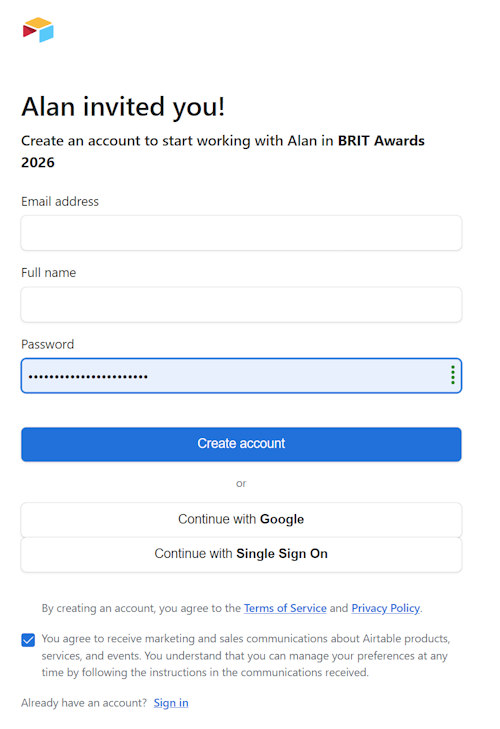
<table border="1" id="bkmrk-%C2%A0-%C2%A0-you-will-receive" style="border-collapse: collapse; width: 100%;"><colgroup><col style="width: 50%;"></col><col style="width: 50%;"></col></colgroup><tbody><tr><td>You will receive an invitation email with a link to a page similar to the one on the right, prompting you to create an AirTable account that will allow you to access the app.  
  
Please ensure that the email address you enter is the same as the email address to which the invitation was sent. If you would prefer to log on with a different email address, do not complete the invitation form. Instead, email the person who invited you, and they will send a new invitation to your preferred address.  
  
Please do not use Google or Single Sign On, as these are not currently supported in the app.  
  
If you already have an AirTable account set up with the same email address as the invitation was sent to, you can use the <u>Sign In</u> link at the bottom of the page.  
  
You may wish to untick the marketing and sales permission checkbox.  
  
​Once signed in you will be taken to the app's main menu.

</td><td>[![documentation-britawards-approvals-invitation.png](https://storytime.mianite.uk/uploads/images/gallery/2026-01/scaled-1680-/documentation-britawards-approvals-invitation.png)](https://storytime.mianite.uk/uploads/images/gallery/2026-01/documentation-britawards-approvals-invitation.png)</td></tr></tbody></table>

# Main Menu

When you log onto Airtable at the link you were sent when you were invited to use the app, you will see the main menu, as shown below (the left-hand panel), along with a summary of requests received to date (the right-hand panel).

*Depending on the access level you have been granted, you may have the ability to add to and edit lists, or you might simply have the ability to view lists.* The *All Requesters* menu option takes you to the list of organisations and individuals who can submit requests.  
  
​The *All Technical Requests* menu option contains a range of sub-options allowing you to view requests in different ways. For example, the there are options taking you to views limited to the specific types of request shown (Power and Internet/Furniture/Feeds and Other).

[![1. Summary of Requests.png](https://storytime.mianite.uk/uploads/images/gallery/2026-01/scaled-1680-/1-summary-of-requests.png)](https://storytime.mianite.uk/uploads/images/gallery/2026-01/1-summary-of-requests.png)

# Locations

'Locations' are spaces allocated to specific individuals or organisations. An example would be the space allocated to the BAL Digital team, which is a room in the Dressing Rooms area.

To add this location to the requests database, simply select *Locations (sorted by company)* or *Locations (sorted by area)* from the menu, then click the *Add a location* button.

[![2. Locations by Company.png](https://storytime.mianite.uk/uploads/images/gallery/2026-01/scaled-1680-/2-locations-by-company.png)](https://storytime.mianite.uk/uploads/images/gallery/2026-01/2-locations-by-company.png)

  
After clicking the *Add a location* button, you will be taken to a form that will allow you to select the individual or organisation and enter the area and location of the space allocated to them.

Click on the *+ Select* button to see a list of individuals and organisations already in the system. Click on the appropriate name to select that individual or organisation. You can narrow down the list by entering a few characters into the *Search for option...* box, and you can also add a new individual or organisation by clicking *+ Create new*.

[![3. Add a location.png](https://storytime.mianite.uk/uploads/images/gallery/2026-01/scaled-1680-/3-add-a-location.png)](https://storytime.mianite.uk/uploads/images/gallery/2026-01/3-add-a-location.png)

  
Once you have selected the correct name, enter the Area and Location of the space allocated to the individual or organisation and click the *Submit* button.

# Emailing unique links

Once locations have been added for an organisation or individual, draft an email to them asking that they complete the Technical Request Form, and include the unique link for each location they are responsible for. <span style="color: rgb(224, 62, 45);">(Do not right-click the link in the *Locations* list, as that will copy an Airtable link instead of the correct Fillout link.)</span> Hover over the line for a location and click *Open*, then right-click the link in the side-panel that appears and select *Copy link address,* then paste the link into the email.  
  
To make things clearer for a recipient who will receive multiple links, it would be good to add a description to each link. *e.g.* Design Office: [<u><span style="color: #3a96b8;">https://forms.fillout.com/t/iZJcTuhsZFus?id=rec0NNhdgh96Hb</span></u>)](https://forms.fillout.com/t/iZJcTuhsZFus?id=rec0NNhdgh96Hb))  
  
  
[![Send unique link.png](https://storytime.mianite.uk/uploads/images/gallery/2026-01/scaled-1680-/send-unique-link.png)](https://storytime.mianite.uk/uploads/images/gallery/2026-01/send-unique-link.png)

# Reviewing submissions

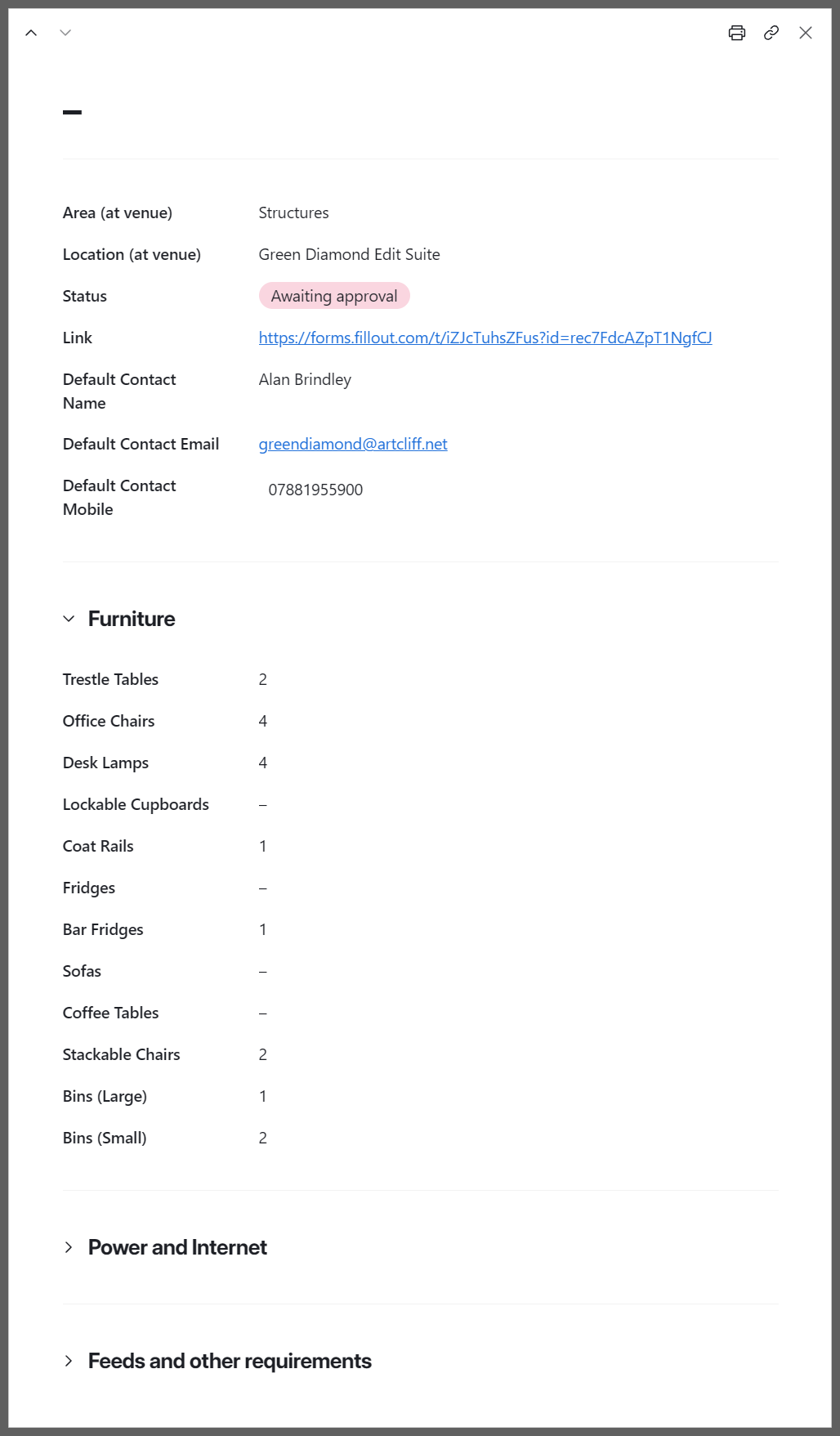
When the form has been completed for a location, the status for that request will automatically change to *Awaiting approval*. To review a request, click on the 'Open' link that appears beside the location's status when you hover over it, or anywhere in the blank space to the right of the *Link* column. This will open a side page with the request details.

[![documentation-britawards-techrequirements-review.png](https://storytime.mianite.uk/uploads/images/gallery/2026-01/scaled-1680-/documentation-britawards-techrequirements-review.png)](https://storytime.mianite.uk/uploads/images/gallery/2026-01/documentation-britawards-techrequirements-review.png)

<table border="1" id="bkmrk-%C2%A0-%C2%A0-the-side-page-in" style="border-collapse: collapse; width: 100%;"><colgroup><col style="width: 50%;"></col><col style="width: 50%;"></col></colgroup><tbody><tr><td>The side page includes expandable sections for *Furniture, Power and Internet* and *Feeds and other requirements*​.

Once these have been reviewed, the status for that location should be changed to either *Clarification requested* or *Approved (locked)* by clicking on the current status in the *Locations* list and selecting the appropriate option from the dropdown (shown below).

[![documentation-britawards-techrequirements-dropdown.png](https://storytime.mianite.uk/uploads/images/gallery/2026-01/scaled-1680-/documentation-britawards-techrequirements-dropdown.png)](https://storytime.mianite.uk/uploads/images/gallery/2026-01/documentation-britawards-techrequirements-dropdown.png)

When clarification is needed, an email should be sent to the appropriate contact asking them to make the necessary changes to the form using the original link.

</td><td>[![documentation-britawards-techrequirements-details.png](https://storytime.mianite.uk/uploads/images/gallery/2026-01/scaled-1680-/documentation-britawards-techrequirements-details.png)](https://storytime.mianite.uk/uploads/images/gallery/2026-01/documentation-britawards-techrequirements-details.png)</td></tr></tbody></table>

Once status has been set to *Approved (locked),* no further changes can be made via the link. Instead, details of the request will be displayed along with an email address for any urgent last minute changes.

# THE REQUEST FORM

When the email recipient clicks on a unique link, they will be taken to the introduction page. The responses they give will be stored in the database at the location specified by that link.

---

##### INTRODUCTION PAGE

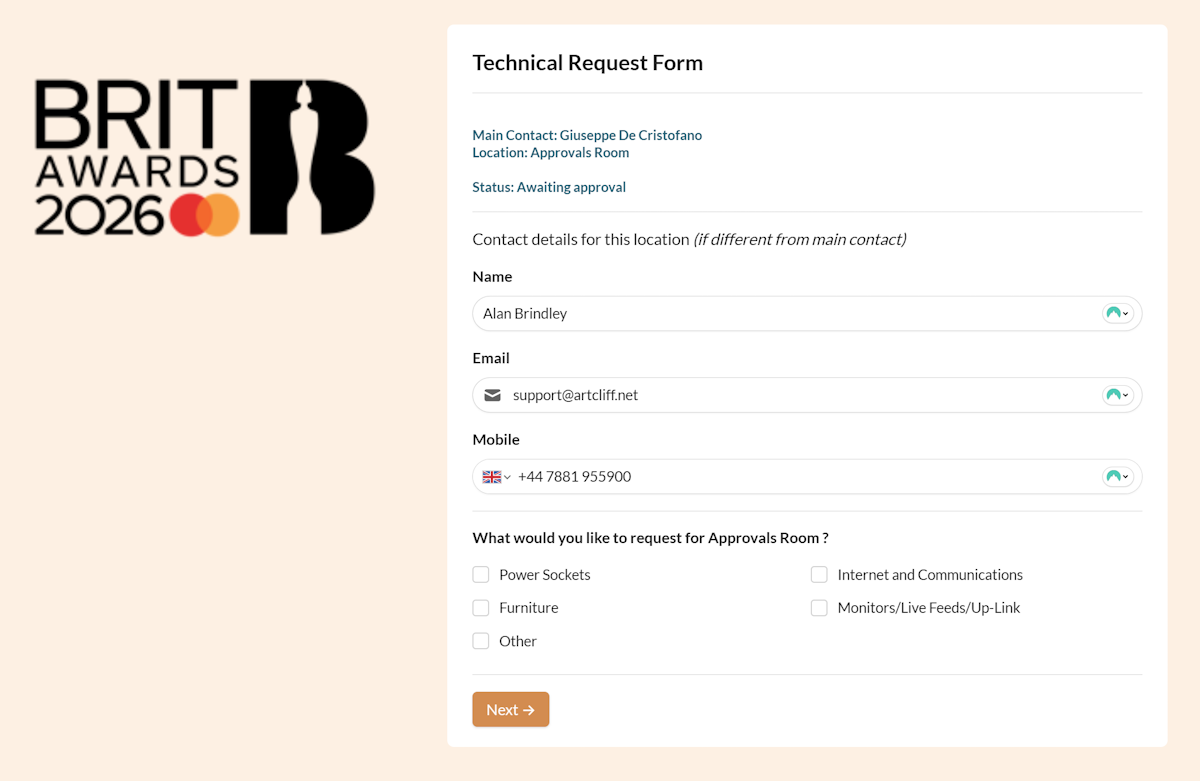
<table border="1" id="bkmrk-%C2%A0-%C2%A0-this-page-shows-" style="border-collapse: collapse; width: 100%;"><colgroup><col style="width: 37.2951%;"></col><col style="width: 62.7843%;"></col></colgroup><tbody><tr><td>This page shows the specific location for which requirements are to be entered and the main contact name for the company/individual. Details for a different contact, specific to this location, can be entered if desired.  
  
Ticking *Power Sockets, Internet and Communications, Furniture, Monitors/Live Feeds/Uplink* or *Other* will allow requirements for these to be entered on the following pages. Pages will be hidden for anything that is not ticked.

</td><td>[![4a. Request - Introduction.png](https://storytime.mianite.uk/uploads/images/gallery/2026-01/scaled-1680-/4a-request-introduction.png)](https://storytime.mianite.uk/uploads/images/gallery/2026-01/4a-request-introduction.png)</td></tr></tbody></table>

---

##### POWER REQUIREMENTS PAGE

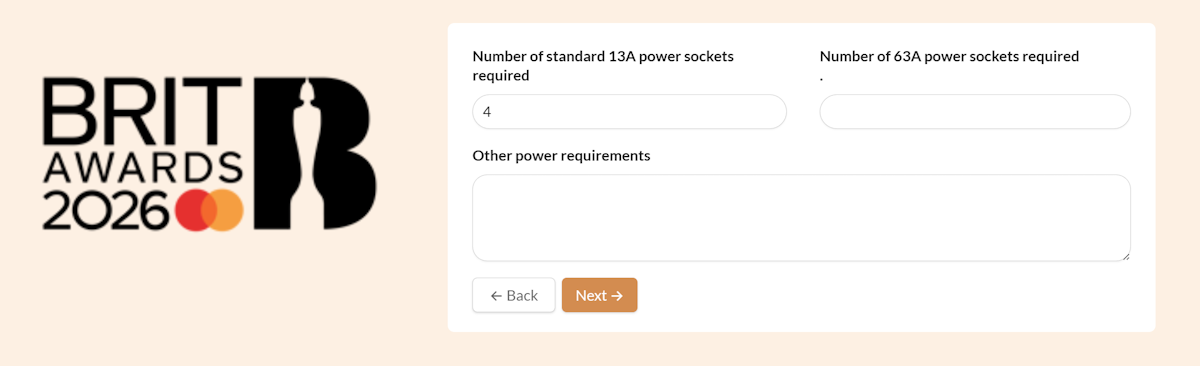
<table border="1" id="bkmrk-%C2%A0-this-page-allows-p" style="border-collapse: collapse; width: 100%;"><colgroup><col style="width: 37.6588%;"></col><col style="width: 62.4207%;"></col></colgroup><tbody><tr><td>This page allows power requirements to be described, including the number of 13A and 63A sockets needed, as well as a general description of any other power requirements.

</td><td>[![4b. Request - Power.png](https://storytime.mianite.uk/uploads/images/gallery/2026-01/scaled-1680-/4b-request-power.png)](https://storytime.mianite.uk/uploads/images/gallery/2026-01/4b-request-power.png)</td></tr></tbody></table>

---

##### INTERNET AND COMMUNICATIONS REQUIREMENTS PAGE

<table border="1" id="bkmrk-%C2%A0-%C2%A0-this-page-allows" style="border-collapse: collapse; width: 100%;"><colgroup><col style="width: 38.4921%;"></col><col style="width: 61.5873%;"></col></colgroup><tbody><tr><td>This page allows Internet connectivity requirements to be described. Ticking *Wired Internet connections required* and/or *Walkie Talkies required* opens additional fields to detail these requirements.

</td><td>[![4c. Request - Internet and Communications.png](https://storytime.mianite.uk/uploads/images/gallery/2026-01/scaled-1680-/4c-request-internet-and-communications.png)](https://storytime.mianite.uk/uploads/images/gallery/2026-01/4c-request-internet-and-communications.png)

[![4d. Request - Internet and Communications (ticked).png](https://storytime.mianite.uk/uploads/images/gallery/2026-01/scaled-1680-/4d-request-internet-and-communications-ticked.png)](https://storytime.mianite.uk/uploads/images/gallery/2026-01/4d-request-internet-and-communications-ticked.png)

</td></tr></tbody></table>

---

##### FURNITURE REQUIREMENTS PAGE

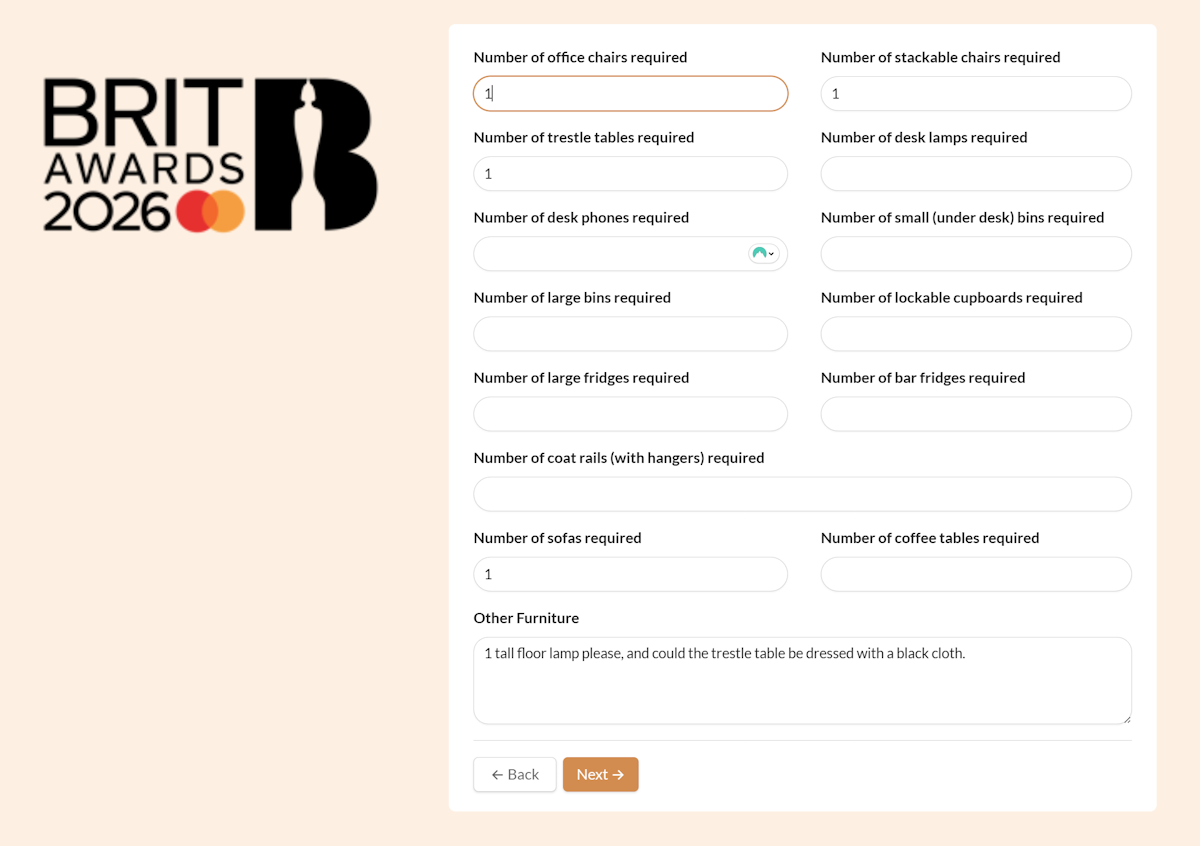
<table border="1" id="bkmrk-%C2%A0-%C2%A0-this-page-allows-1" style="border-collapse: collapse; width: 100%;"><colgroup><col style="width: 38.6111%;"></col><col style="width: 61.4683%;"></col></colgroup><tbody><tr><td>This page allows the most common types of furniture requirements to be requested.

Other furniture requirements can be detailed in the final field on the page.

</td><td>[![4e. Request - Furniture.png](https://storytime.mianite.uk/uploads/images/gallery/2026-01/scaled-1680-/4e-request-furniture.png)](https://storytime.mianite.uk/uploads/images/gallery/2026-01/4e-request-furniture.png)</td></tr></tbody></table>

---

##### FEED REQUIREMENTS PAGE

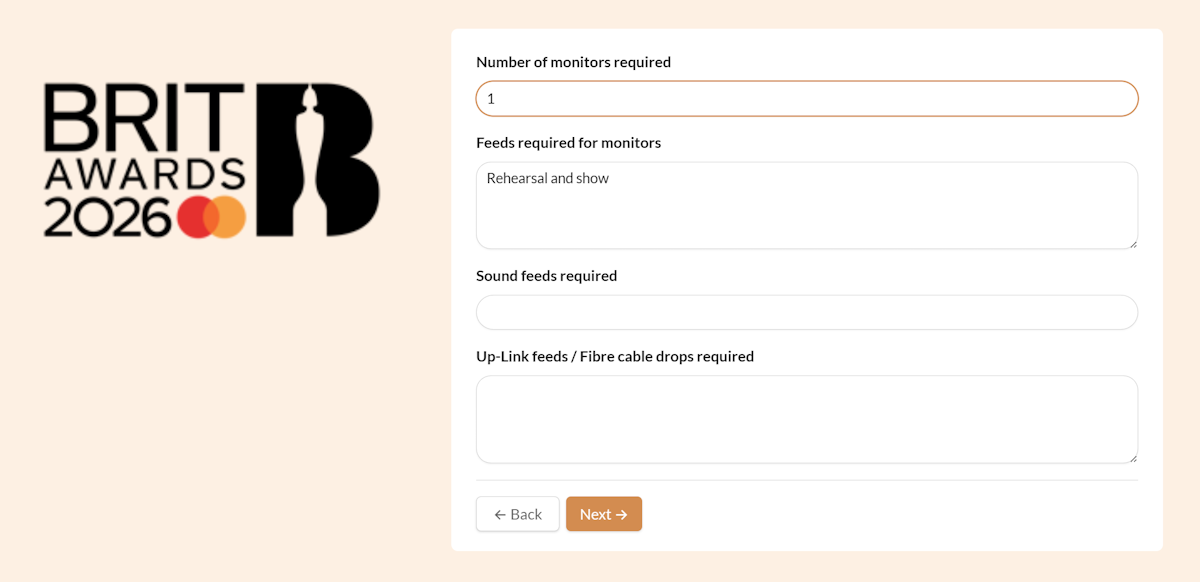
<table border="1" id="bkmrk-%C2%A0-%C2%A0-this-page-allows-2" style="border-collapse: collapse; width: 100%;"><colgroup><col style="width: 39.0873%;"></col><col style="width: 60.9921%;"></col></colgroup><tbody><tr><td>This page allows monitor and audio/video feed requirements to be described. It also allows up-link feeds and fibre cable drops to be requested.

</td><td>[![4f. Request - Feeds.png](https://storytime.mianite.uk/uploads/images/gallery/2026-01/scaled-1680-/4f-request-feeds.png)](https://storytime.mianite.uk/uploads/images/gallery/2026-01/4f-request-feeds.png)</td></tr></tbody></table>

---

##### OTHER REQUIREMENTS PAGE

<table border="1" id="bkmrk-%C2%A0-%C2%A0-this-page-allows-3" style="border-collapse: collapse; width: 100%;"><colgroup><col style="width: 39.3254%;"></col><col style="width: 60.754%;"></col></colgroup><tbody><tr><td>This page allows a general description of any other requirements.

</td><td>[![4g. Request - Other.png](https://storytime.mianite.uk/uploads/images/gallery/2026-01/scaled-1680-/4g-request-other.png)](https://storytime.mianite.uk/uploads/images/gallery/2026-01/4g-request-other.png)</td></tr></tbody></table>